Payment plans from the HubSpot deal.
For multi-location businesses that bill high-ticket items over time. The deal your rep just closed becomes the quote, the invoice and the plan: charged on schedule, the card fee recovered, and the money landed in that location's own Stripe account and books.
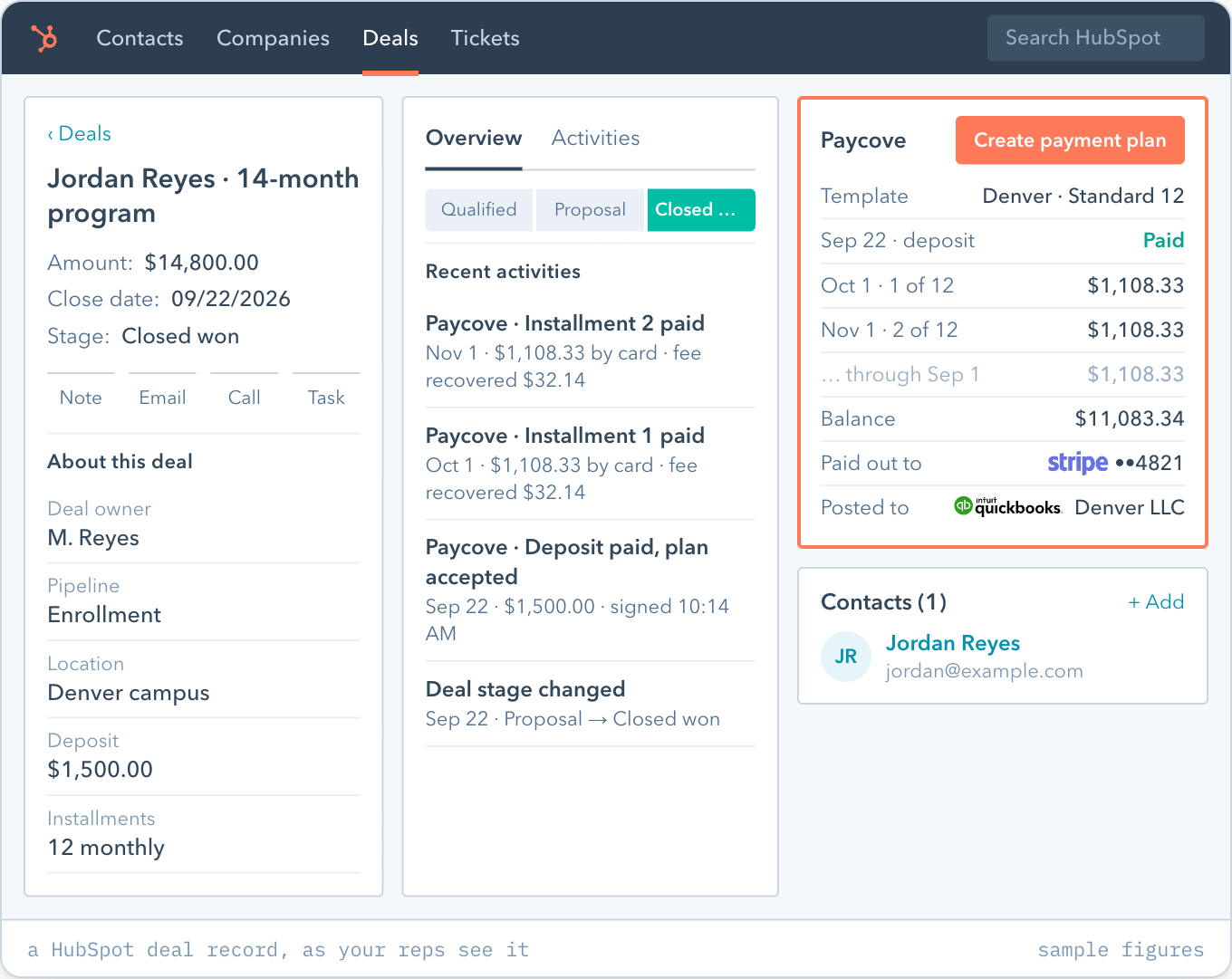
One button on the deal builds the quote, the invoice and the plan.
Your portal already knows who owes what. Paycove picks it up from there.
Set the templates once
One per location: its branding, its Stripe account, its QuickBooks Online or Xero file, its plan rules. Templates are chosen by pipeline, location or product, so the rep never picks.
The rep presses one button
Paycove writes the schedule from the deal's own terms and sends it. Or the payer builds their own plan inside your rules: minimum down, number of payments, fees.
Paycove collects and writes back
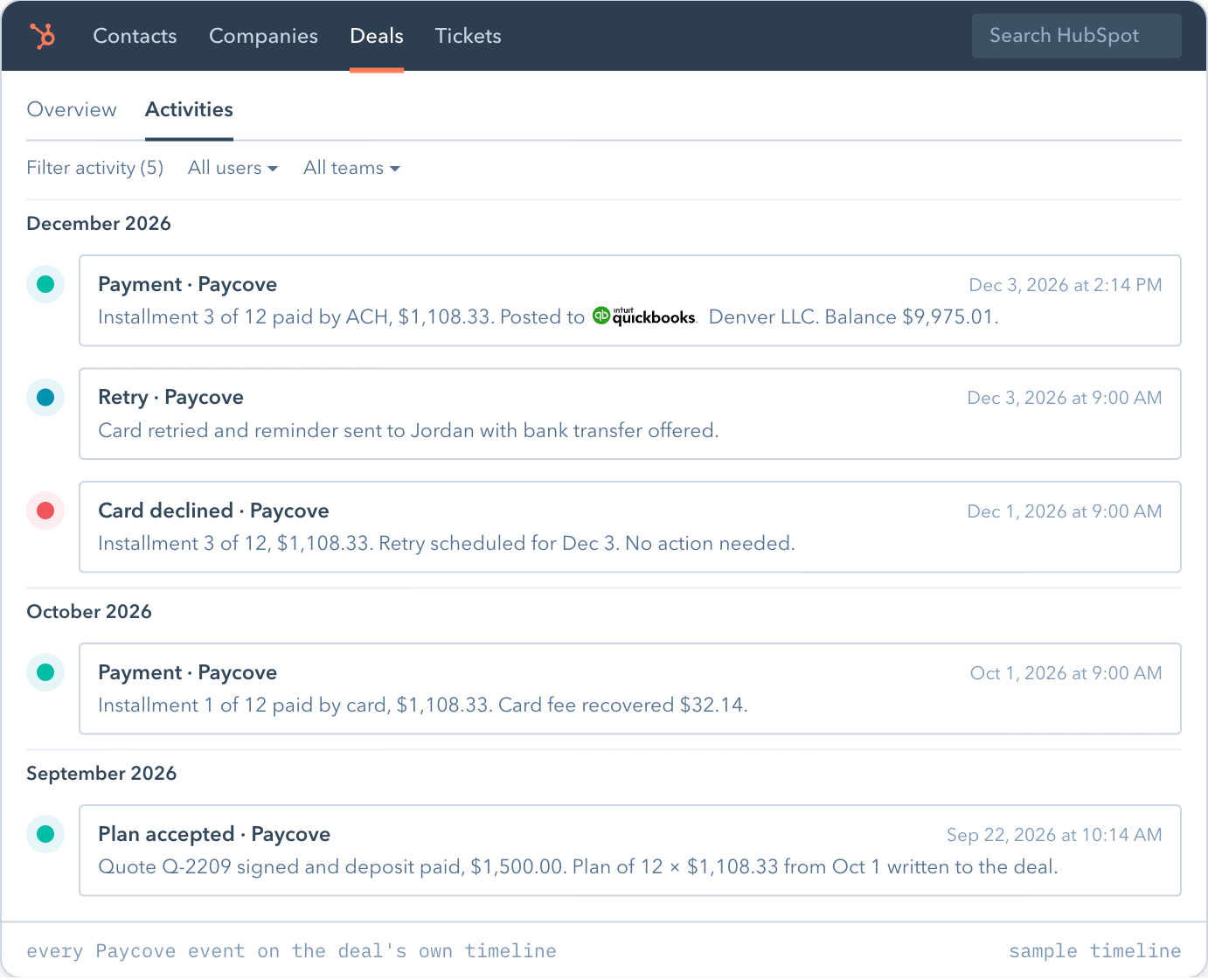
Charged on schedule, declined cards retried, ACH offered. Every payment lands on the deal and in that location's books. You hear about a payment only if it stays open.
The deal stays the source of truth.
The invoice your customer sees opens inside HubSpot. Reps open Paycove only to change something. If a customer withdraws mid-plan, stop, refund, split or recalculate the remainder from one screen.
Paycove reads
- Contacts and company
- Line items and products
- Pipeline, stage and location
- Your custom deal properties
Paycove writes back
- Plan status and remaining balance
- Next charge date
- Paid, declined and viewed events on the timeline
- Custom fields on contacts and companies
Card fees are recovered inside the plan.
About 2.9% of every card payment goes to the processor, on every installment, at every location, for as long as the plan runs. Paycove adds it back as a disclosed surcharge where your state allows it, and offers ACH beside card everywhere. You set the rate per payment method. The recovered fee posts to that location's books on its own line.
About $7,250 a month leaves with the processor. $87,000 a year. Paycove recovers it inside the plan.
Each location's money lands in that location's own account.
All run from the one HubSpot portal. A new location is a duplicated template, live on your rules the same day.
Stripe, one account per location
Each template points at its own Stripe account, so payouts land in that location's bank.
 ••4821$12,940.00 +$341.20 ••0937$9,810.00 +$262.10 ••2210$8,475.00 +$219.60
A monthly statement per location
What was collected and what was recovered, for each location, every month.
Before you install.
What does it cost?
$500 a month plus 1% of every payment Paycove collects. One account covers every location. A group of separate accounts under one parent adds $50 a month per additional account. Custom above about $1M a month. See pricing.
Is this a loan for my customers?
No. It's a plan from you, with no interest, no lender in the middle and no credit check. The customer stays yours.
Do my reps have to learn a new tool?
They work from the deal. The invoice the customer sees opens inside HubSpot; reps open Paycove only to edit.
We already run open plans in a spreadsheet.
We set the account up with your team, connect Stripe and your books per location, and work out together how the plans already running come across.
What do I need to install it?
A HubSpot portal on any plan, including the free CRM; a Stripe account per location; and QuickBooks Online or Xero if you want payments posted to the books. Book 15 minutes and we set it up with you.
We use Pipedrive, not HubSpot.
Same plan from the deal. Pipedrive is supported on every plan; Salesforce, Capsule, Pipeline CRM and Zendesk Sell on request. See integrations.
Built for businesses collecting $100K a month or more.
More than one location, customers who pay in installments, and each location needing its own invoices, payouts and books.
Book 15 minutes